
Give each POS modifier a rule that says what it does to the recipe, so your food cost counts each plate the way it left the kitchen.
A modifier is an option rung up with a menu item on your POS: "Add bacon", "No bun", "Sub gluten-free bun", "Make it a double". Each one changes what that plate cost you. RestaurantMate reads every modifier from your POS sales lines (Toast and SpotOn today; we add your POS on request). A rule for each modifier tells RestaurantMate how it changes the recipe.
Here is an example from Juniper Kitchen · Main Street. The Juniper Burger recipe has a 6 oz beef patty, a brioche bun and a slice of cheddar. In the last 30 days, "Add bacon" was rung up 412 times at $2.00. Its rule says it adds 2 oz of bacon. Bacon from Prairie Meats cost $5.20 / lb on the last invoice, so each use costs $0.65 and leaves $1.35. Until that rule exists, the bacon on those 412 burgers counts as $0 in your food cost.
Words used in this article
- COGS: what your food costs you. On the COGS page, this is the recipe cost of everything you sold.
- Recipe cost: what one plate costs as the recipe is written, priced from what you paid on your invoices.
- Food cost %: food cost divided by sales. $30 of food on $100 of sales is 30%.
- Modifier rule: a short line that says what a modifier does to the recipe, for example "Adds 2 oz Bacon".
- Role: a label on a recipe line that says which part of the dish it is, such as the patty, the bun, the spirit or the mixer. Rules use roles. That is how "Double" on a vodka soda doubles the vodka and leaves the soda alone.
- Included side: a side that comes with an entrée and is rung up at $0, such as the fries with a burger.
Before you start
- Your role. To open the COGS page, you need View access to Food cost & recipes. Owners have it, and so do the built-in Admin, Location manager, Bookkeeper and View only roles.
- To approve or change a rule, you need Edit access to Food cost & recipes. Owners, Admins and Location managers have it. Bookkeepers and View only can read rules but can't change them. A button you can't use is greyed out. Only a workspace owner can change roles. See Give each person only the pages and locations they need.
- POS sales connected. Modifiers come from your sales lines. See Connect your POS sales (Toast and SpotOn).
- Recipes for your menu items. A rule changes a recipe, so the item needs a recipe first. See Add your recipes and read your food cost (COGS).
- Prices for what modifiers add. If "Add avocado" adds avocado, avocado needs a price. Prices come from your invoices.
What a rule can say
In the rule editor, What it does has five choices:
| Choice | What it does to the recipe | Example at Juniper Kitchen | The rule reads |
|---|---|---|---|
| Adds | Adds an amount of an ingredient | Add bacon | Adds 2 oz Bacon |
| Removes | Takes a part of the recipe or an ingredient off | No bun | Removes the bun |
| Swaps | Replaces one part of the recipe with something else | Sub gluten-free bun | Swaps the bun for 1 piece Gluten-free bun |
| Scales | Multiplies the whole recipe, or one part of it | Double (on a vodka soda) | Scales the spirit ×2 |
| Included, not costed | Leaves the cost as it is | Medium rare | Included, not costed |
Each rule also has a Scope: One item, One category or Whole location. When two rules could apply, the most specific one wins. For example, a location-wide "Add bacon" rule can add 2 oz of bacon to every item, and a one-item rule can add 3 oz to the Club Sandwich. The Club Sandwich gets 3 oz, because its rule is more specific.
Who writes the rules
Your agent writes most of them. The agent is the AI assistant inside RestaurantMate. You give it a name when you first open it; at Juniper Kitchen it is called Basil.
- The agent drafts a rule for each modifier used 3 or more times in 90 days. It works through new ones about every 6 hours. One-off special instructions are left alone.
- A second pass checks each draft. When a rule is clearly right, it is marked Checked by your agent and counts as reviewed. Clearly right means all of these are true:
- Every line has a price.
- The units convert.
- The cost is in a normal range for that kind of item.
- The modifier's words match the item it adds.
- The charge covers the cost.
- When something is unclear, the agent asks you one short question instead.
- Rules the agent writes are saved as not checked until a check passes. Once a person has checked a rule, the agent never changes it.
Step 1: Find the modifiers that need you
- In the sidebar, click COGS.
- Pick a date range with the chips at the top: 7d, 30d, 90d, MTD (this month so far), LM (last month) or Custom.
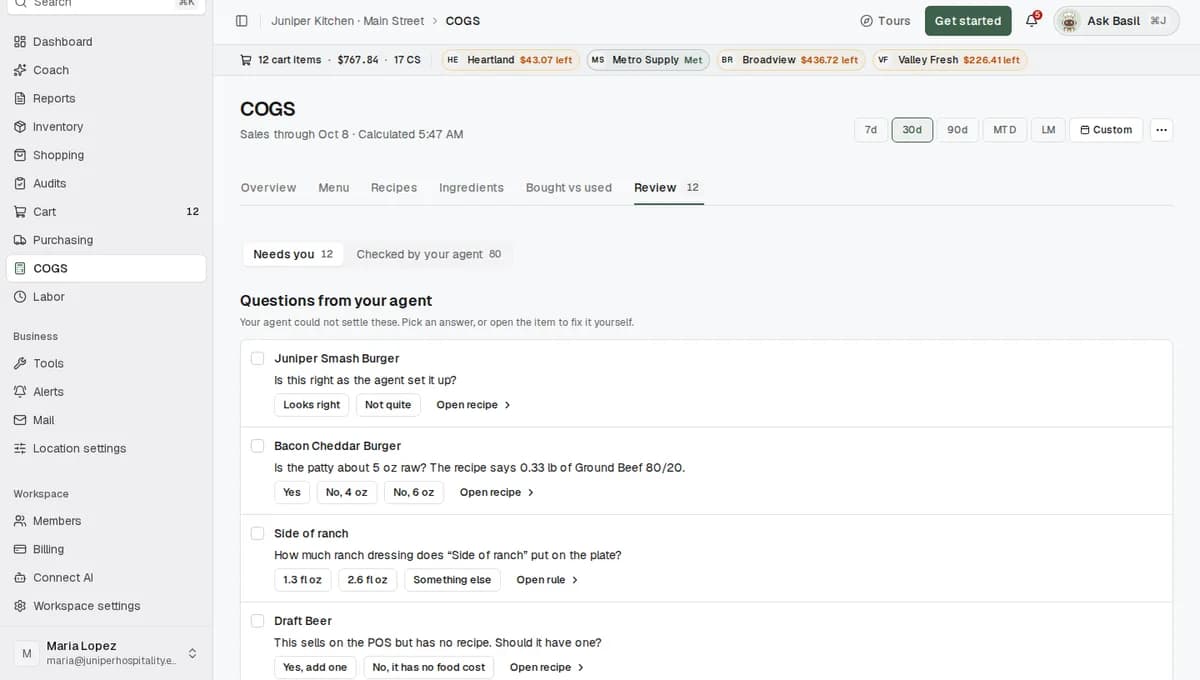
- Click the Review tab. It opens on Needs you.
- Look for the two modifier groups:
- Modifier rules to check: rules the agent drafted from past orders that nobody has confirmed yet.
- Modifiers without a rule: modifiers with no rule, so they add nothing to your food cost.
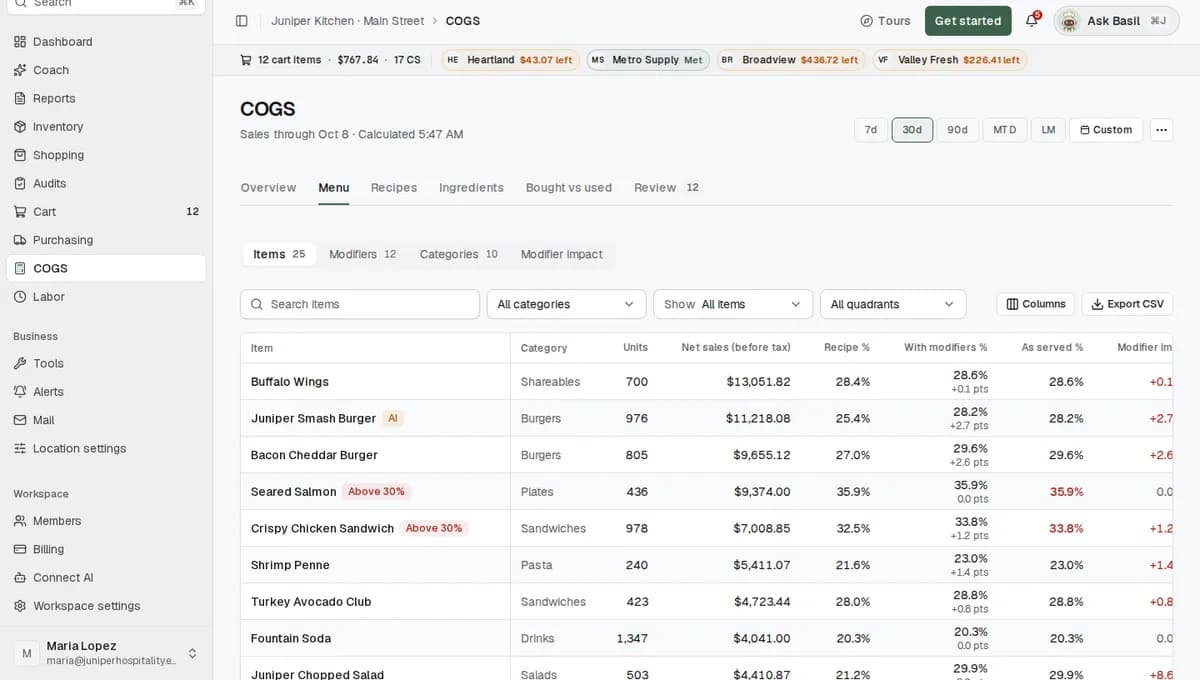
To see every modifier in one table, click the Menu tab, then Modifiers. The columns are Modifier, Uses, Charged, Cost, Net and What it does. A Not checked label with an amber dot means the AI set the rule and nobody has confirmed it. No rule yet means the modifier has no rule.
Step 2: Answer your agent's questions
Questions come first on Needs you, under Questions from your agent. Each one has two or three answer buttons.
At Juniper Kitchen, the agent asks: "What does 'Juniper style' add to a burger?" The buttons are Pickled onions and aioli and Nothing, it's a name. Click the answer that matches your kitchen. The agent saves your answer to its memory and uses it for the rule.
If no answer fits, open the rule and set it yourself (Step 3).
Step 3: Check a rule and fix it if it's wrong
- Click Open rule on a row in Review, or click a row in Menu > Modifiers. A panel opens with Uses, Charged, Cost and Net, the rule in plain words, its Scope and the items it is used on most.
- If the rule is right, click Approve.
- If it's wrong, click Edit rule.
- Under What it does, pick Adds, Removes, Swaps, Scales or Included, not costed.
- Fill in the rest:
- Adds and Swaps: pick the Item, type the Quantity and pick the Unit, such as oz, lb or piece.
- Removes: pick the Item. If the rule already removes a part of the recipe, such as the bun, the field reads Item (optional) and you can leave it empty.
- Scales: type the number of Times. 2 means double. 0.5 means half.
- Read the sentence after Will read:. It shows the rule in plain words, for example "Adds 2 oz Bacon".
- Click Save and mark checked.
If the rule covers a whole category or the whole location, a note appears above the buttons, for example: "This rule applies to Whole location, so a change here reaches every item it covers." Read it before you save.
Step 4: Get a rule for a modifier that has none
When you open a modifier from Modifiers without a rule, the panel says: "Not costed: no rule says what this modifier uses, so it adds no cost. Add a rule, or treat it as included in the item."
Your agent works through new modifiers about every 6 hours, so a draft may already be on its way. To get a rule now, ask your agent:
- Click Ask Basil in the top bar. The button shows your agent's name. You can also press ⌘J on a Mac or Ctrl+J on Windows.
- Say what the modifier does in plain words, for example: "'Add avocado' adds 2 oz of avocado to any item."
- The agent saves the rule and shows the change with an Undo button. The rule is saved as not checked.
- Open the rule in Menu > Modifiers and check it as in Step 3.
The agent is on for owners and for roles that include it, such as Admin. It works with your own permissions, so writing a rule needs Edit access to Food cost & recipes. If you don't see the Ask button, ask a workspace owner.
Step 5: See what modifiers did to your food cost
- Click the Menu tab, then Modifier impact.
- Read the three tiles from left to right:
- Recipe cost: food cost if every plate were made as written.
- With modifiers: recipe cost with add-ons, removals and swaps, as they were rung up.
- As served: with modifiers plus included sides. This matches the Food cost tile on the Overview tab.
- Read the line above the chart. At Juniper Kitchen · Main Street, for the last 30 days, it says: "Modifiers added $1,140 of food cost (+1.2 pts) this period: add-ons $820, included sides $410, swaps $60, removals −$150". Pts means percentage points. Food cost was 29.6% of sales as written and 30.8% as served.
- Under Recipe cost to as served, click a line, such as Add-ons, to see the modifiers behind it.
- Next to Rank modifiers by, pick Cost impact to see which modifiers add the most food cost. Pick Money lost to see add-ons and swaps you charge less for than they cost.
At Juniper Kitchen, Money lost puts "Add grilled shrimp" first. It is charged $3.00. The 4 oz of shrimp costs $3.60 at $14.40 / lb, so every use loses $0.60.
This view counts fully costed items only, meaning items where every recipe line has a price.
To check one dish, click Menu > Items and open it, for example Juniper Burger. Its Modifiers section lists each modifier rung up on it, with price and cost per use and in total. Modifiers that cost more than they charge show in red.
What happens next
- Saving a rule queues an update. You see "Rule saved. Costs update after the recalculation, usually a few minutes." The update runs on your RestaurantMate device or on our server.
- Every night, RestaurantMate recalculates food cost for the last 35 days with your current rules.
- When a new modifier has been used 3 times in 90 days, your agent drafts a rule for it. If the draft is clearly right, it is checked for you. If not, you get a question on Review.
Tips
- Clear the easy ones together. On Needs you, click Approve the N low-priority AI recipes and rules to approve simple builds like packaged drinks and modifiers you don't charge for. You can also tick rows and click Approve N or Dismiss N.
- Start where the money is. Use the High priority filter on Review, or Money lost on Modifier impact.
- Read the scope before you edit. A rule for the whole location changes every item it covers.
- Look at add-on prices. If an add-on shows up under Money lost, your menu price for it may be too low.
Troubleshooting
A modifier shows "No rule yet". It has no rule, so it adds $0 to food cost. Wait for your agent's draft, or ask your agent for one (Step 4). Modifiers used fewer than 3 times in 90 days don't get a rule.
Modifier impact says some modifier uses have no rule yet. Those uses count as $0 there. Give them rules from Review > Modifiers without a rule.
Swaps or Scales is missing from What it does. Swaps shows only when the rule works on one part of the recipe, such as the bun. Scales shows only on rules that already scale. Ask your agent to set up that kind of rule, then check it.
A modifier's cost looks too low. Check the quantity and unit on the rule. Then check that the ingredient it adds has a price. Ingredients with no price are listed on Review under Ingredients without a price, with a Set a price button.
I saved a rule and the numbers didn't change. The update usually takes a few minutes. If the page header says "Update queued at 2:14 PM, not started", it is waiting for your device or our server to pick it up. The nightly recalculation runs either way.
"No garlic mayo" doesn't take the whole sauce off. Garlic mayo here is a batch recipe, something you make in house from several ingredients. A removal rule takes the mayonnaise line out of the batch instead of the whole batch, so the plate keeps the cost of the rest of the sauce. This is a known limit today.
A side shows a food cost over 100%. Sides rung up at $0 with an entrée have no sales of their own. Their cost belongs to the entrée. Open the entrée and look at Served as to see it counted correctly.
Approve or Edit rule is greyed out. Your role has View access to Food cost & recipes. Ask a workspace owner for Edit access.
Common questions
Where do the modifiers come from? From your POS. Each order comes in with its items and the modifiers rung on them. Toast sales come in through yesterday. SpotOn sales sync about three times a day.
Do I have to write a rule for every modifier? No. Your agent drafts them and checks the clear ones. You answer its questions and check the rest.
What does "Checked by your agent" mean on a rule? A second pass looked at the rule and found it clearly right. It counts as reviewed. On the Review tab, switch to Checked by your agent to see the reason for each one. Click Looks right to confirm it, or Undo to send it back to your list.
Does this change anything in my POS? No. RestaurantMate only reads your POS. The rules live in RestaurantMate.
Why did my food cost % go up after I added rules? A modifier without a rule counts as $0. Once "Add bacon" has a rule, the bacon is counted. The new number is closer to what those plates really cost you.