
Open any item on the Inventory page to see what each of your vendors charges for it, priced on the same unit (per lb, per oz, per gallon or per each).
Vendors sell the same item in different packs, so the case with the lowest price can still cost more per pound. RestaurantMate works out each vendor's price per unit from that vendor's own pack information. You compare one number per vendor.
Words used in this article
- Case price: what the vendor charges for one case, box or package.
- Pack: how much is in that case, as the vendor writes it. For example "4 x 1 gal" or "25 lb".
- Unit price (or per-unit price): the case price divided by how much is in the case. For example $1.14 / lb.
- SKU: one vendor's product, with its own product number. Each vendor can have several SKUs linked to one of your items.
Before you start
- Your role. You need View access to Inventory to open the page and read prices. Owners, Admins and Location managers have it, and the built-in Buyer role shows the Inventory page too.
- To fix a vendor product or hide a vendor, you need Edit access to Inventory. That covers typing a missing pack size, rating a SKU and hiding a vendor.
- To add to the cart from the price panel, you need Edit access to Ordering.
- If a button is greyed out, hover over it to see which access is missing. Only a workspace owner can change roles. See Give each person only the pages they need.
- At least one connected vendor. Vendors with a website get fresh prices every night. Vendors you order from by email show prices from their invoices and price sheets. See Connect a vendor that has a website and Connect a vendor you order from by email.
Compare prices for one item
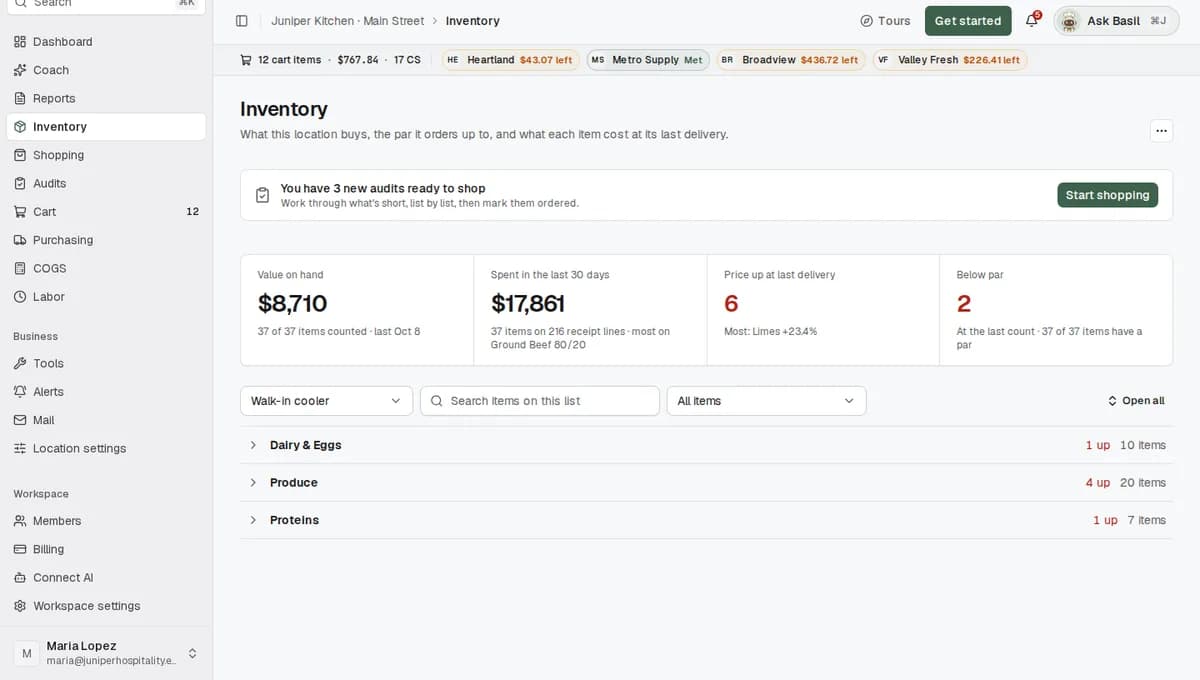
In the sidebar, click Inventory. If your location has more than one list, pick one in the list picker at the top left, for example Kitchen.
Click a group to open it, for example Produce. Groups start closed. Click Open all to open every group on the list.
The table already gives you two price columns. Unit price is what the item cost per unit at its last delivery. Change is how much that moved since the delivery before, for example +12.4%.
Click the item's row, for example Roma tomatoes. The Vendors and prices panel opens under the row, with one column for each vendor that sells the item.
Read each vendor's column. It leads with that vendor's best product for the item: photo, the vendor's name for it, pack, case price, and the unit price under the case price. Some vendors also show an each price. Best price marks the product with the lowest unit price across your vendors.
For the tomatoes above:
Vendor Product Case price Unit price Valley Fresh Produce TOMATO ROMA 6X6 25# $28.40 $1.14 / lb Club Wholesale Roma Tomatoes 20 lb $24.98 $1.25 / lb Heartland Foodservice Tomato, Roma, Fresh 25 LB $31.90 $1.28 / lb Club Wholesale has the lowest case price, but its box holds 5 lb less. Per pound, Valley Fresh Produce is cheaper, so its column gets Best price.
If the item has more vendors than fit on your screen, scroll sideways. With four or more vendors, a row of vendor names above the columns lets you jump to one.
Choose the order with Sort. Lowest price puts the lowest unit price first. Recommended follows your choices before price. It puts in-stock products first, then the product you marked as preferred, then products you have bought before, then the lowest unit price. Vendors you buy from come before vendors you don't. Your choice of sort is remembered in this browser.
Optional: change the unit. Click the unit next to a price, for example $1.14 / lb, and pick Auto (item default), oz, fl oz, lb, gal or count (count means per each, one piece). The new unit applies to this item only, in the panel and in the table. Other items keep their own unit.
Sometimes the vendor's pack doesn't say enough to convert. For example, a case sold by count has no weight, and you pick lb. RestaurantMate then asks "Enter how many lb one case contains." Type the amount and click Save, or click Not sure. If you skip it, that price reads "— / lb" until someone fills it in.
Click a case price to open its Price history. It shows two kinds of points over time. Delivered is what you paid, from your invoices. Advertised is the price the vendor's website showed your account.
When you have picked a vendor, type a quantity in its case box (and the each box, if it has one) and click Add to cart. The cart groups everything by vendor. See Review your cart and send it to your vendors.
You can move to the next or previous item with the arrow keys while the panel is open. On a phone, each item is a card. Tap it to open the vendor columns.
What the badges mean
| Badge | What it means |
|---|---|
| Best price | The lowest unit price for this item across your vendors. |
| 12x Ordered | You have bought this product here 12 times. Hover to see the last date. |
| Usually Heartland | This column is first, but the item normally arrives from another vendor (here, Heartland Foodservice). |
| Out of stock, Low stock and other stock labels | What the vendor's website says about stock. |
| Save 8% or Deal | The vendor shows a deal. Click View deal to see the old price, the new price and what you save. Not every vendor shows deals. |
| Special order, Pickup, Discontinued and similar | Delivery or availability notes from the vendor. |
| Missing unit (amber) | The vendor gives the case price but not how much is in the case. See the next section. |
| No vendor SKU | This price came from a receipt or a price sheet. You can compare it, but you can't order it from here. |
| Updated with a date | When this price was last checked. |
Fix a "Missing unit" price
RestaurantMate never guesses a pack size. If a vendor shows a case price but not what is in the case, the column shows Missing unit instead of a unit price. You fill it in once.
- Click Missing unit. The SKU editor opens with the note "One answer is needed to show the unit price".
- It asks how much is in one case, for example "How many lb are in one vendor case/package?" Look at the label on a case you received. For items sold by count, enter how many pieces are in the case (if one bag holds 50 avocados, enter 50).
- Type the amount and click Save corrections.
Say Heartland Foodservice lists jumbo yellow onions at $38.40 a case with no weight. Your last case says 40 lb. Type 40, and the price reads $0.96 / lb on every card and table that shows it.
Automatic updates from the vendor won't overwrite the amount you typed.
Tell RestaurantMate which products you want
Each vendor column has a thumbs up and a thumbs down at the top right.
- Thumbs up (Mark as preferred SKU): this product is the one you want from this vendor. It moves up in Recommended, even if another product costs a little less.
- Thumbs down (Tell us what is wrong with this SKU) opens Why not this SKU? Pick a reason:
- Product details are wrong: fix the name, brand, pack size or weights in the SKU editor.
- Wrong brand: the product is close, but you don't want this brand.
- Price is too high: choose Rank it last (keep it, always at the bottom of this vendor's list) or Remove it from this list (hide it for this item).
- Linked to the wrong item: move it to the right item, or to a new one.
To hide a vendor, click Hide and the vendor's name in its column. The vendor is then hidden on every item card at this location. To bring it back, find it in the row at the bottom of the panel and click Show.
What happens next
Prices are checked every night. For vendors with a website, the RestaurantMate device in your restaurant signs in with your own login overnight and reads the price of every product linked to your items. You see your account's prices, including any contract pricing (prices you have agreed with that vendor). Each price shows the date it was last updated.
Invoices add what you actually paid. Every line on a delivered invoice becomes a delivered price. That is the Delivered line in Price history and the Unit price column on Inventory.
Email vendors use invoices and price sheets. A vendor such as Riverside Dairy that you order from by email has no website to check. Its prices come from its invoices and its price sheets (the price lists it sends you). The vendor can email a PDF price sheet to your RestaurantMate inbox, or you can upload one with Add on the Purchasing page. You'll find them under Purchasing > Price sheets. These prices are only as fresh as the last invoice or price sheet.
New products get linked in the background. For every item on your lists, RestaurantMate searches each website vendor's catalog using the item's name and words from your past invoices. Our AI keeps only the results that are the same product. Anything you have received on an invoice is linked on its own. The AI only matches products. It never sets a price or estimates a pack size.
How the unit price is worked out. RestaurantMate uses the first of these that works:
- An amount a person typed in (see "Fix a Missing unit price").
- Pack math from the vendor's own pack text. "4 x 1 gal" is 4 gallons. "10/50 EA" is 500 each.
- The vendor's stated net weight, then its gross weight.
- Catch weight. Some cases have no fixed weight and are billed by what they weigh, like a brisket. RestaurantMate divides the case price by the vendor's own per-lb price.
If none of these works, you see Missing unit.
Weight converts to weight, and volume to volume. An ounce of weight and a fluid ounce count as the same on purpose, so a gallon jug can be compared with a pound tub. A count never turns into a weight unless the pack says both.
You'll see cheaper options in other places too. Once prices are in, they also show up here:
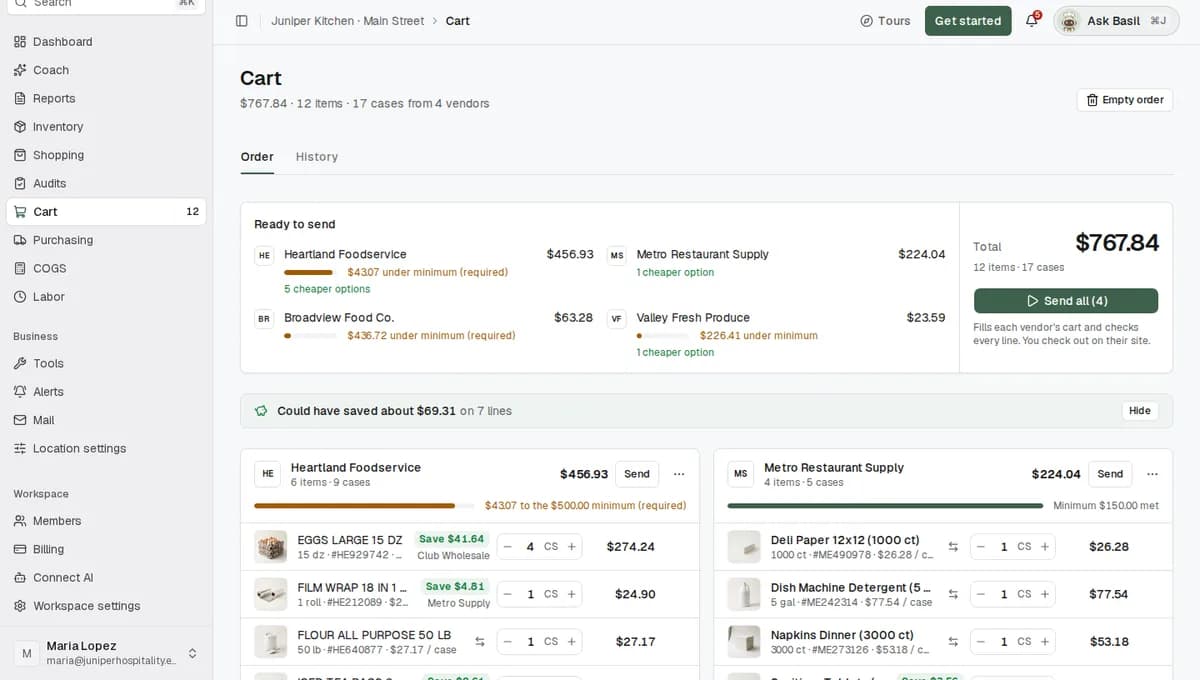
- Cart: a green Save $14.28 chip under a line names the vendor that is cheaper. It only appears when the other product is a close match, in stock, priced in the last 30 days, and saves at least $1 and 2% of the line.
- Search (Cmd+K on a Mac, Ctrl+K on Windows): type a product and see each vendor's matches side by side. See Shop across your vendors.
- Purchasing > Compare: your spend this period against the last, with a Can save filter.
- Coach: Money on the table lists vendor switches worth making, checked every night. See Coach.
Tips
- Start with what went up. On Inventory, set Show to Price up at last delivery. Compare those items first.
- Check both prices. The website price and what you paid can differ because of substitutions, catch weight or fees. Price history shows both.
- Pick a unit per item. There is no switch that changes the unit for every item at once. Set the unit on the items where it matters, such as count for lemons or gal for fryer oil.
Troubleshooting
A price shows "Missing unit". The vendor didn't publish what is in the case. Type the amount from the case label (see above).
A price reads "— / lb". You picked a unit the vendor's pack doesn't support. Type how much one case contains, or set the unit back to Auto (item default).
The Change column says "Check pack". The price more than doubled, or fell by more than half, since the delivery before. This usually means the receipt had a different pack size. Open the item to check its deliveries. These items are kept out of the "price up" count. To list them, set Show to Price moved too far to trust.
A vendor column says "No confident match yet". The background search hasn't found a product it is sure about. The vendor may still carry it. Click the search button in that column (for example Search Club Wholesale) to search the vendor's catalog yourself. This needs Edit access to Ordering.
The panel says "Searching your vendors". The item is new and the background search is still running. This takes a few minutes. Check back shortly.
A price looks old. Look at the updated date next to it. If a vendor login stops working, nightly prices for that vendor pause until the login is fixed. See Connect a vendor that has a website.
Add to cart is greyed out. If it says No vendor SKU, the price came from a receipt or price sheet and can't be ordered here. If it says Out of stock, the vendor's website shows the product as out of stock.
A vendor is missing from every item. Someone hid it. Find it in the row at the bottom of the panel and click Show.
Common questions
Are these my prices or list prices? Your prices. The RestaurantMate device signs in with your own vendor login, so you see what the vendor shows your account, including contract pricing. For vendors you order from by email, prices come from your invoices and price sheets.
How fresh is a price? Website vendors are checked again every night, and each price shows when it was last updated. Invoice prices are as of the delivery date.
What if the packs are different, like a 4 x 1 gal case and a 5 gal bucket? Both are turned into a price per gallon from each vendor's pack information, so you compare the same unit.
Does RestaurantMate pick the cheapest vendor for me? No. It shows every vendor's price on the same unit and marks the lowest with Best price. You decide what goes in the cart. Sending the order needs someone with Full access to Ordering.
Can I stick with a vendor even if it costs a bit more? Yes. Mark its product as preferred, or rank the other products last. Recommended follows your choices first. You can also hide a vendor at this location.